Guide
Day-to-day use of TrueDeck Studio. Install from Releases (do not clone the repo just to run the app). For first-time setup detail, see Getting started.
Studio UI layout
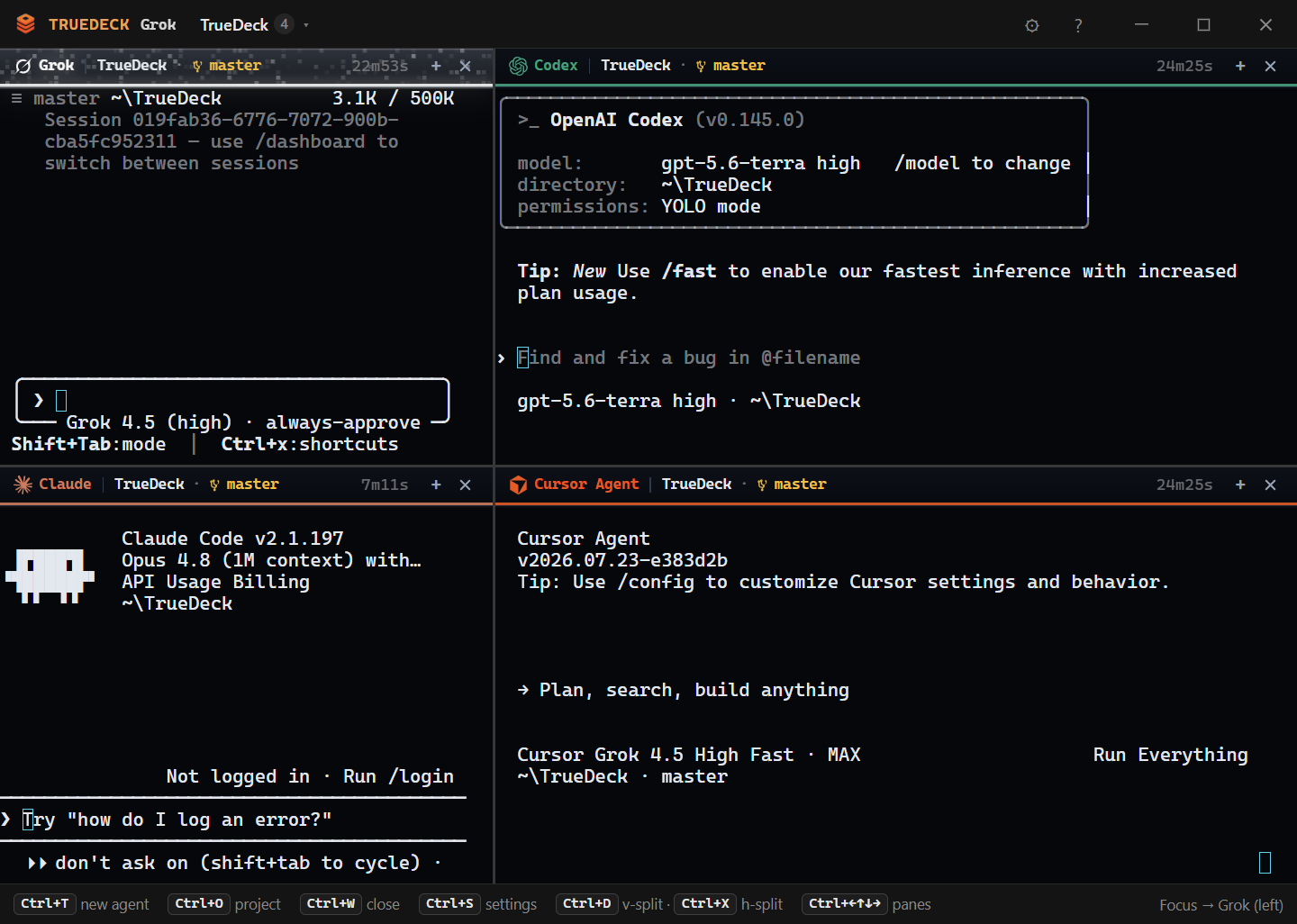
| Control | Action |
|---|---|
| Project ▾ | Recent projects and Open Folder (Ctrl+O) |
| Board | Task board (Ctrl+B) |
| ⚙ | Settings (Ctrl+S) |
| ? | Help / replay onboarding |
| + / Ctrl+T | Agent palette |
| Drag a tab | Left / Right / Top / Bottom to split; center joins a group |
Almost all of the window is terminal chrome. TrueDeck is not a three-column IDE.
Projects
A project is a folder TrueDeck tracks in app data (projects.json):
| Field | Role |
|---|---|
name | Display name (usually folder basename) |
root | Absolute path |
onOpenCommands | Shell commands run as panes when you open the project |
defaultAgents | Preferred agent ids for that project |
lastOpened | Recents ordering |
Open / switch
- Ctrl+O - native folder picker (adds project if new)
- Project menu - switch among recents
On-open commands
Settings → Project → On-open commands. Example: rojo serve as a shell pane when you open a Roblox repo. These are not agent presets; they spawn as command sessions and can be restored with the session layout.
Reopen last project
Default: on. On launch, TrueDeck restores the last project and respawns saved tabs (capped). See Session restore.
Tabs and sessions
Each agent or command pane is a session (PTY):
- Running sessions stream into an xterm instance
- Ctrl+W closes the active tab
- Ctrl+M minimizes the active tab (still running); Ctrl+Shift+M restores
- Ctrl+Tab / Ctrl+Shift+Tab cycles tabs inside the focused pane group
- Ctrl+1-9 jumps to tab index 1-9
- Ctrl+N opens a plain Shell tab in the project root
Sessions show agent name, color, and exit status when the process ends.
Pane groups (splits)
| Action | Shortcut |
|---|---|
| Split vertical (side-by-side) | Ctrl+D |
| Split horizontal (top/bottom) | Ctrl+X |
| Merge all groups to one pane | Ctrl+Alt+D (or Ctrl+Alt+X) |
You need at least two tabs (or two leaves) to split. Hard cap: 16 panes. Soft warning around 12 panes.
Drag-and-drop zones:
- Left / Right / Top / Bottom - create or target a split edge
- Center - move the tab into that group
Selecting a tab focuses its group without collapsing the other pane.
Task board
Ctrl+B toggles the board. Create tasks, set status, assign an agent, and dispatch. Full detail: Task board.
Settings
Ctrl+S opens Settings. Tabs:
| Tab | Contents |
|---|---|
| General | Theme, memory abstraction notes, palace path, inject-on-start |
| MCP | Unified MCP list, add/remove user servers, sync/export |
| Terminal | Font size, layout mode, agent frame TUI, PTY engine label, shortcut hint |
| Project | Current project name/path, on-open commands |
| Agents | Agent list / reset presets |
| About | Version, update check, replay onboarding |
See Configuration.
Session restore
On quit, TrueDeck saves the last-active layout to session-layout.json and a per-project bank to session-layouts.json. Launch restores the last folder (plus its on-open commands, e.g. Rojo). Opening another project restores that folder's parked tabs.
Memory (automatic)
You do not manage a memory badge. On project open and agent spawn, TrueDeck ensures .memory/, refreshes .truedeck/auto-context.md, injects env paths, and warms MemPalace when configured. Details: Memory providers.
PTY backend
Rust (truedeck-backend) is the session backend. There is no node-pty fallback.
Tips
- Open a project before Ctrl+T / Ctrl+N / board dispatch
- Prefer fewer simultaneous agent panes for machine load
- Install CLIs system-wide so resolve finds them on
PATH - On Windows, use
cursor-agentinstall, not Cursor IDE shortcuts - Full shortcut list: Keyboard shortcuts